How Instagram Stores Reels, Photos, and Drafts Behind the Scenes
Social media applications have evolved far beyond simple photo-sharing platforms. Today, apps like Instagram allow users to record high-quality videos, edit Reels, apply filters, save drafts, upload large media files, and instantly consume content from creators across the world.
While these features appear simple from the user's perspective, a sophisticated storage and delivery architecture works behind the scenes to ensure everything feels fast, reliable, and seamless.
Have you ever wondered what happens when you record a Reel and save it as a draft? Where is that video stored? How does it survive app restarts? How does Instagram deliver millions of videos to users worldwide with minimal loading time?
In this article, we'll explore the architecture and product-thinking concepts behind storing, processing, and delivering media in modern social media applications. While Instagram serves as inspiration, the focus will remain on general software architecture rather than proprietary implementation details.
Why Social Media Apps Need Efficient Media Storage
Unlike text-based applications, social media platforms primarily deal with media.
Examples include:
- Photos
- Videos
- Stories
- Reels
- Profile pictures
- Thumbnails
- Live stream recordings
A single high-quality Reel can easily consume tens or hundreds of megabytes.
Now imagine:
- Millions of users
- Billions of uploads
- Continuous viewing activity
- Global distribution
Without efficient storage systems, applications would face:
- Slow uploads
- Excessive storage costs
- Poor user experience
- Long loading times
- Increased network usage
Efficient media storage helps platforms:
- Reduce infrastructure costs
- Improve performance
- Speed up uploads
- Deliver content faster
- Create a smoother user experience
For media-heavy platforms, storage architecture becomes one of the most critical parts of the system.
The Journey of Recording a Reel
Let's begin with a common user journey.
Suppose Sarah records a 30-second Reel.
From her perspective:
- Open Instagram
- Record a Reel
- Add music and effects
- Save as draft
- Post later
Simple.
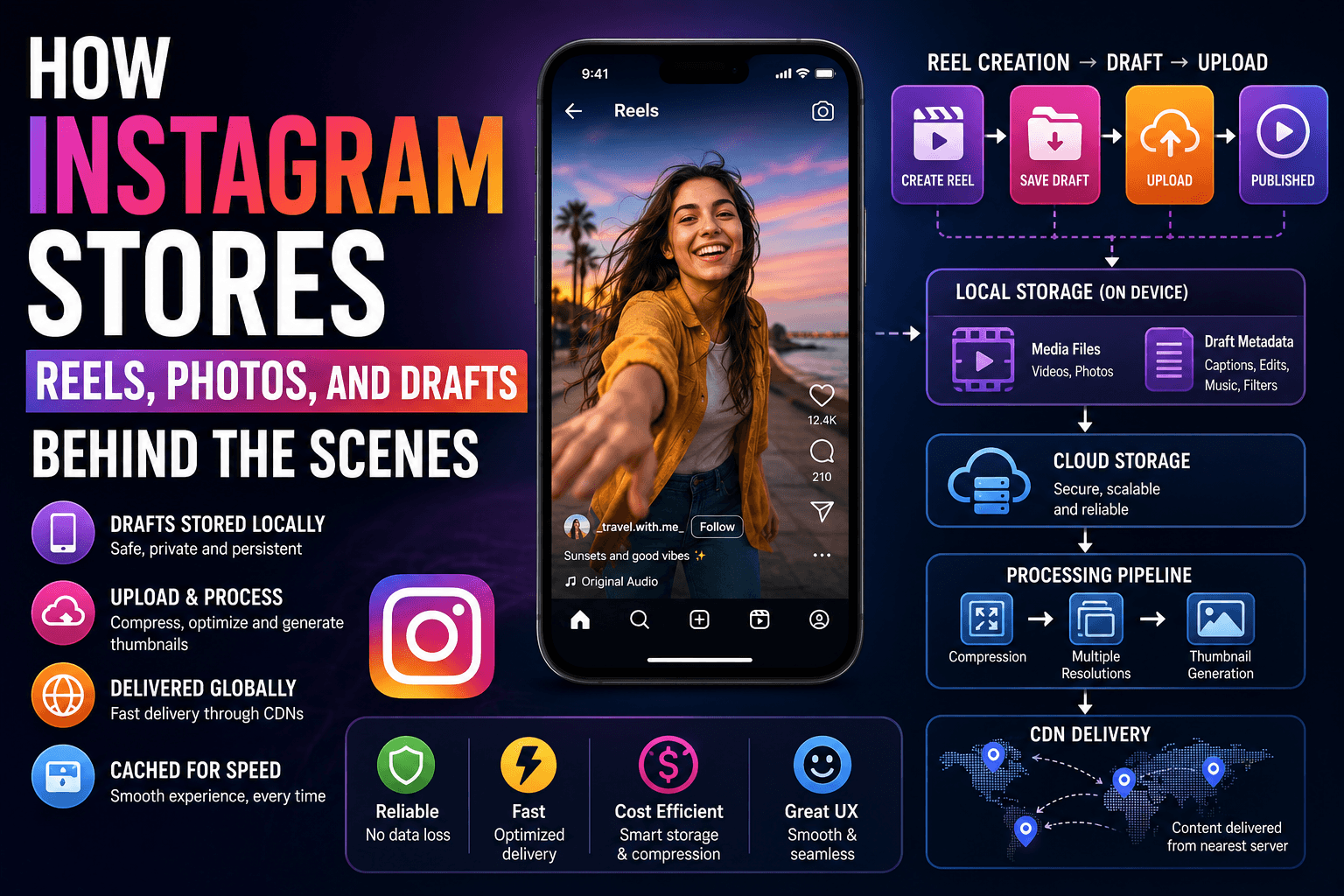
Behind the scenes, however, multiple systems are involved.
Camera
   ↓
Video File Creation
   ↓
Local Storage
   ↓
Draft Metadata
   ↓
Optional Upload
   ↓
Cloud Storage
   ↓
Content Processing
   ↓
Content Distribution
The Reel goes through several stages before reaching viewers.
How Photos and Videos Are Stored Before Upload
One common misconception is that media gets uploaded immediately after creation.
In reality, most applications first store media locally on the device.
When a user records a Reel:
User Records Video
        ↓
Video Saved Locally
        ↓
Editing Begins
This local copy serves several purposes:
- Prevents data loss
- Enables editing
- Allows retrying failed uploads
- Supports offline usage
Without local storage, users would lose content whenever:
- The app crashes
- The network disconnects
- The battery dies
- The upload fails
For reliability reasons, media is almost always stored locally first.
What Happens When a User Saves a Draft
Saving drafts is one of the most user-friendly features in modern social media apps.
Imagine spending 20 minutes creating a Reel.
You add:
- Filters
- Captions
- Stickers
- Music
- Trimming adjustments
Then you decide:
"I'll post this tomorrow."
The app saves a draft.
But what exactly gets saved?
Usually two categories of data:
Media Files
The actual video or photo.
Example:
Draft Video File
draft_video_001.mp4
Draft Metadata
Additional information such as:
Caption
Music Selection
Filter Settings
Crop Settings
Hashtags
Mentions
Cover Image
Example:
{
  "caption": "Weekend vibes",
  "music": "Track123",
  "filter": "Vintage",
  "cover": "frame45"
}
The media and metadata together form a complete draft.
How Drafts Survive App Restarts
One important requirement for drafts is persistence.
Users expect drafts to remain available even after:
- Closing the app
- Restarting the phone
- Receiving system updates
To achieve this, drafts are stored in persistent local storage.
Instead of storing draft information only in memory:
❌ RAM Only
Applications save drafts to:
✓ Device Storage
✓ Local Database
✓ File System
When the app launches again:
App Opens
      ↓
Load Draft Metadata
      ↓
Locate Media Files
      ↓
Reconstruct Draft
      ↓
Display to User
This gives users confidence that their work won't disappear unexpectedly.
Local Storage vs Cloud Storage
Modern social media applications use both local and cloud storage.
Each serves a different purpose.
Local Storage
Located directly on the user's device.
Examples:
- Drafts
- Temporary files
- Cached media
- Upload queues
Benefits:
- Fast access
- Offline availability
- Lower network usage
Limitations:
- Limited capacity
- Can be deleted
- Device-specific
Cloud Storage
Located on remote servers.
Examples:
- Published photos
- Published Reels
- Stories
- User-generated content
Benefits:
- Highly scalable
- Available worldwide
- Accessible from multiple devices
Limitations:
- Requires internet access
- Higher infrastructure costs
Local Storage vs Cloud Storage Architecture
            User Device
                  │
      ┌───────────┴───────────┐
      │                       │
Local Storage           Cloud Storage
      │                       │
Drafts                Published Content
Cache                 User Media Library
Temporary Files       Global Distribution
Both storage systems work together to create a reliable user experience.
Uploading Large Media Files Efficiently
Uploading a photo is relatively easy.
Uploading a large Reel is much more challenging.
Consider:
Photo: 4 MB
Reel: 150 MB
Large uploads introduce problems:
- Slow networks
- Interrupted connections
- Battery consumption
- Higher server load
Modern platforms use multiple strategies to improve efficiency.
Chunked Uploads
Instead of uploading an entire file at once:
150 MB Video
The file is divided into smaller chunks:
Chunk 1
Chunk 2
Chunk 3
Chunk 4
...
Benefits:
- Easier retries
- Better reliability
- Reduced failure impact
If one chunk fails, only that chunk needs retransmission.
Background Uploading
Uploads often continue while users:
- Browse other content
- Switch screens
- Lock their devices
This improves user experience because the upload process feels less disruptive.
Retry Mechanisms
If connectivity drops:
Upload Interrupted
        ↓
Pause
        ↓
Reconnect
        ↓
Resume Upload
This prevents users from starting over repeatedly.
Media Processing and Compression
Raw media files are often too large for efficient storage and delivery.
Before publication, platforms process media.
This processing may include:
- Compression
- Resolution adjustment
- Format conversion
- Optimization
Why Compression Matters
Imagine a 200 MB Reel.
Without compression:
- Storage costs increase
- Upload times increase
- Viewing becomes slower
After optimization:
200 MB
   ↓
25 MB
The user experiences:
- Faster uploads
- Faster playback
- Lower data usage
Compression is one of the most important techniques used by media platforms.
Media Processing Pipeline
A simplified processing pipeline might look like:
User Upload
      ↓
Cloud Storage
      ↓
Media Processor
      ↓
Compression
      ↓
Multiple Resolutions
      ↓
Thumbnail Generation
      ↓
Ready for Delivery
This pipeline prepares content for millions of viewers.
Thumbnail Generation and Previews
Videos require preview images.
These preview images are called thumbnails.
When users browse:
- Explore Page
- Reels Feed
- Profile Grids
The application usually displays thumbnails first.
Instead of loading a 50 MB video:
Load Thumbnail
      ↓
Display Preview
      ↓
Load Video When Needed
Benefits include:
- Faster browsing
- Reduced bandwidth usage
- Better responsiveness
How Thumbnails Are Generated
The system often extracts frames from the video.
Example:
Video Timeline

0s
5s
10s
15s
20s
One frame may be selected as:
Cover Image
Alternatively, users can choose their preferred frame manually.
Caching Frequently Viewed Content
Imagine opening Instagram and seeing the same Reel repeatedly.
Downloading it every time would be inefficient.
Instead, applications use caching.
A cache is temporary storage used for fast retrieval.
Example of Caching
Without cache:
Open Reel
      ↓
Download Again
With cache:
Open Reel
      ↓
Load From Device
Benefits:
- Faster loading
- Reduced data usage
- Improved battery efficiency
- Better user experience
Cache Lifecycle
Content Viewed
       ↓
Store in Cache
       ↓
Reuse Multiple Times
       ↓
Cache Expires
       ↓
Remove Content
This process balances performance and storage usage.
Content Delivery Using CDNs
One major challenge is global content distribution.
Suppose a creator uploads a Reel in Mumbai.
Users watching from:
- London
- New York
- Tokyo
- Sydney
should all experience fast playback.
Delivering every request from a single server would create latency problems.
This is where CDNs become important.
What Is a CDN?
CDN stands for:
Content Delivery Network
A CDN is a network of geographically distributed servers.
Instead of serving content from one location:
User → Main Server
The content is replicated across many locations.
User → Nearby CDN Server
Benefits:
- Lower latency
- Faster loading
- Reduced server load
- Better scalability
CDN-Based Content Delivery Flow
Creator Uploads Reel
          ↓
Cloud Storage
          ↓
CDN Replication
          ↓
Global Edge Servers
          ↓
Viewer Requests Content
          ↓
Nearest CDN Responds
This allows billions of media requests to be served efficiently.
Managing Storage, Performance, and User Experience
Every social media platform constantly balances three competing priorities.
Storage Costs
Media requires enormous amounts of storage.
Platforms must optimize usage carefully.
Performance
Users expect:
- Fast uploads
- Instant previews
- Smooth playback
Performance directly affects engagement.
User Experience
The product should feel effortless.
Users should not think about:
- Storage systems
- Upload pipelines
- CDN infrastructure
They simply expect everything to work.
The architecture exists to make the experience appear simple.
Putting Everything Together
A complete Reel lifecycle may look like this:
Record Reel
      ↓
Store Locally
      ↓
Save Draft
      ↓
Persist Draft Metadata
      ↓
Upload Media
      ↓
Cloud Storage
      ↓
Media Processing
      ↓
Compression
      ↓
Thumbnail Generation
      ↓
CDN Distribution
      ↓
Viewer Cache
      ↓
Playback
Every step contributes to reliability, scalability, and performance.
Conclusion
Modern social media applications handle far more than simple photo uploads. Behind every Reel, Story, and draft is a sophisticated architecture designed to balance reliability, speed, scalability, and user experience.
When users record a Reel, the media is typically stored locally first, allowing drafts to survive app restarts and network failures. Once uploaded, cloud storage systems, media processing pipelines, compression engines, thumbnail generators, caches, and content delivery networks work together to ensure content reaches viewers quickly and efficiently.
Although users only see a simple "Save Draft" or "Upload" button, a complex series of systems operate behind the scenes to protect data, optimize performance, and deliver media to millions of devices worldwide.
The next time you save an Instagram draft or watch a Reel load instantly, remember that an entire ecosystem of storage, processing, caching, and global delivery infrastructure is working silently to make that experience possible.