Building Messaging Apps That Work Offline: A Beginner's Guide to Offline-First Chat Architecture
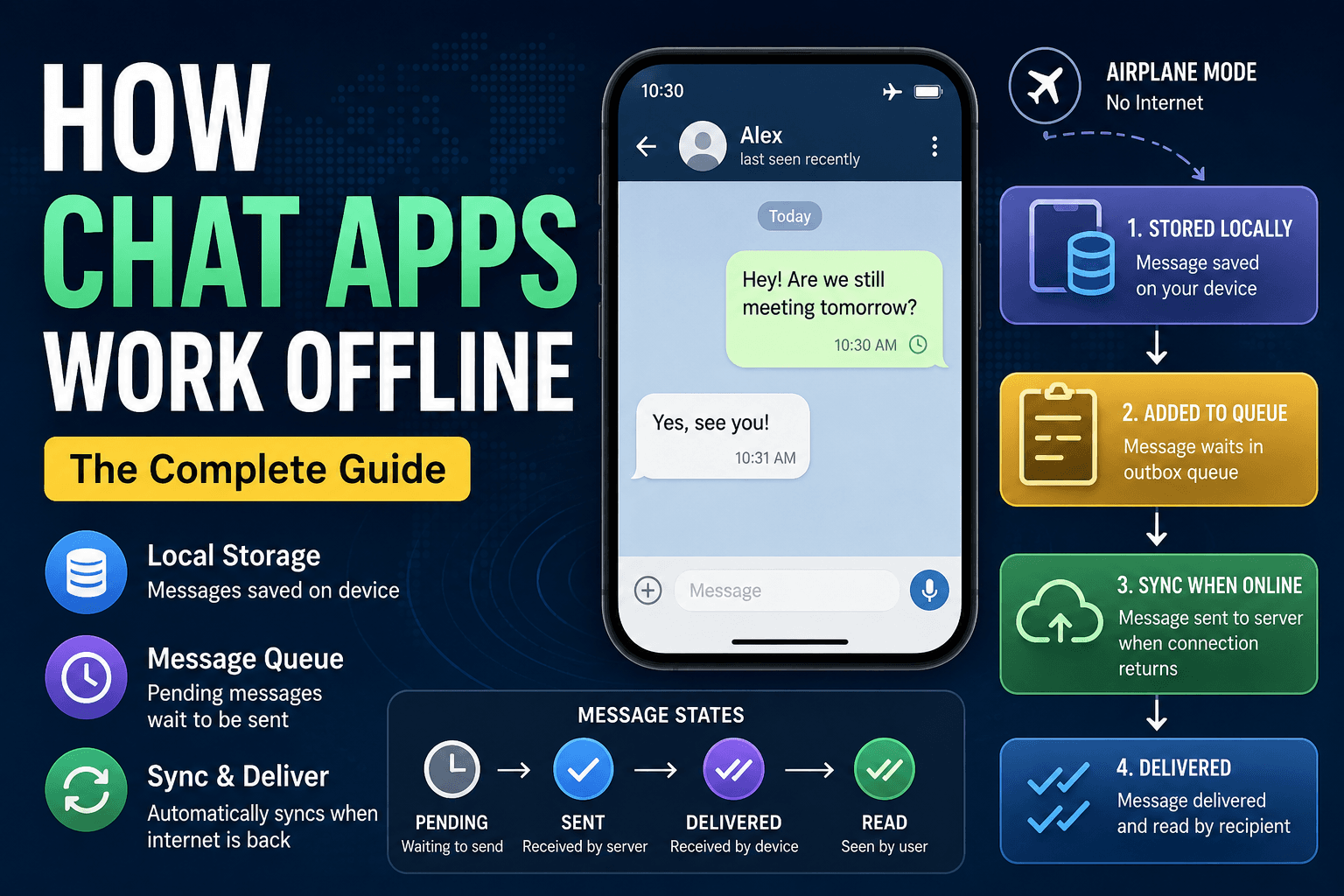
Modern messaging applications have changed how we communicate. Whether it is WhatsApp, Telegram, Signal, Discord, Slack, or Microsoft Teams, users expect messages to be delivered instantly and reliably. However, one challenge every messaging platform must solve is unreliable internet connectivity.
People travel through areas with poor network coverage, switch between Wi-Fi and mobile data, use airplane mode, or experience temporary outages. Despite these interruptions, users still expect the app to feel responsive and trustworthy.
This is where offline-first architecture becomes important.
In this article, we'll explore how messaging apps continue working even when the internet disappears, how messages are stored locally, how synchronization works, and why offline support is essential for a great user experience.
Why Messaging Apps Need Offline Support
Imagine you're on a flight and decide to send a message to a friend.
You type:
"I'll reach around 7 PM."
You press Send.
Would you want the app to:
- Show an error immediately?
- Delete your message?
- Force you to remember and resend it later?
Probably not.
Users expect messaging apps to behave naturally. Even without connectivity, they expect their messages to remain visible and eventually reach the recipient.
Without offline support:
- Messages may be lost.
- Users become confused.
- Conversations appear broken.
- Trust in the application decreases.
Offline support improves:
- Reliability
- User satisfaction
- Message persistence
- Perceived performance
The goal is simple:
Let users continue using the application even when the network is unavailable.
A Simple Scenario: Sending a Message in Airplane Mode
Let's walk through a common example.
Suppose Alice opens a chat application while her phone is in airplane mode.
She sends:
"Hey, are we still meeting tomorrow?"
Even though the internet is unavailable, the app instantly shows the message in the conversation.
To Alice, it appears as if the message was successfully sent.
But what actually happened?
The message has not reached the server yet.
Instead, the app has:
- Saved the message locally.
- Added it to a pending queue.
- Displayed it in the chat interface.
- Marked it as waiting for synchronization.
The message remains stored safely until connectivity returns.
This behavior creates a smooth user experience while maintaining reliability.
Local Storage and Message Persistence
The foundation of offline messaging is local storage.
Instead of relying entirely on the server, messaging apps keep a local database on the device.
Common data stored locally includes:
- Messages
- Conversations
- Contacts
- Attachments
- Drafts
- Pending actions
When a user sends a message offline, it is immediately written into local storage.
Example:
Message ID: temp_12345
Text: Hey, are we still meeting tomorrow?
Status: Pending
Timestamp: 10:45 AM
Because the message is stored locally:
- It survives app restarts.
- It survives temporary crashes.
- It remains visible to the user.
- It can be synchronized later.
This concept is known as message persistence.
Persistence ensures that user actions are never lost simply because the network disappeared.
Why Users Still See Messages Instantly
One interesting question is:
If the message hasn't reached the server, why does it appear immediately?
The answer is simple.
The user interface is reading from local storage rather than waiting for the server response.
Traditional systems often follow this flow:
User → Server → Display Message
Offline-first systems reverse the approach:
User → Local Storage → Display Message
The server synchronization happens later.
This approach provides:
- Instant feedback
- Faster interfaces
- Better responsiveness
- Improved user confidence
Even if the network takes several seconds—or several minutes—the user still sees immediate results.
Message Queueing on the Device
Saving messages locally is only part of the solution.
The application also needs a way to remember which actions still need to be sent to the server.
This is where a message queue comes in.
A queue stores pending operations that haven't been synchronized yet.
Example queue:
1. Message A
2. Message B
3. Message C
While offline:
Message A → Pending
Message B → Pending
Message C → Pending
Nothing is sent immediately.
Instead, the queue waits until connectivity returns.
Offline Message Queue Lifecycle
User Creates Message
          ↓
Store in Local Database
          ↓
Add to Pending Queue
          ↓
Show Message in Chat
          ↓
Wait for Network
          ↓
Reconnect
          ↓
Send to Server
          ↓
Receive Confirmation
          ↓
Update Message Status
This queue-based approach prevents message loss and guarantees that messages are eventually transmitted.
Syncing Messages When Connectivity Returns
Eventually, the device reconnects to the internet.
At this point, the synchronization system becomes active.
The application:
- Detects network availability.
- Reads pending messages from the queue.
- Sends them to the server.
- Receives acknowledgments.
- Updates local records.
Flow:
User
  ↓
Local Storage
  ↓
Pending Queue
  ↓
Internet Restored
  ↓
Sync Service
  ↓
Server
The synchronization process usually happens automatically in the background.
Most users never notice it.
They simply see message statuses change from pending to sent.
Understanding Delivery States
Messaging apps often display different message states to communicate progress.
These states help users understand what has happened to their message.
Pending
The message exists only on the device.
✓ Waiting for connection
The server has not received it yet.
Sent
The server has successfully received the message.
✓ Sent
The recipient may not have received it yet.
Delivered
The recipient's device has received the message.
✓✓ Delivered
The message is now available on the recipient's phone.
Read
The recipient opened the conversation and viewed the message.
✓✓ Read
This provides the highest level of delivery confirmation.
Message State Transition Flow
Pending
   ↓
Sent
   ↓
Delivered
   ↓
Read
Not every application supports all states, but the concept remains similar.
Handling Media Uploads While Offline
Text messages are relatively small.
Media files introduce additional complexity.
Examples include:
- Images
- Videos
- Audio recordings
- Documents
Suppose a user sends a 100 MB video while offline.
The app cannot upload it immediately.
Instead, it stores:
- File location
- Metadata
- Upload instructions
- Pending status
Example:
Video.mp4
Status: Waiting for Upload
Size: 100 MB
When connectivity returns:
- The upload queue resumes.
- The file uploads to the server.
- The message record updates.
- Recipients can access the media.
Many applications also:
- Pause uploads on poor connections.
- Retry failed uploads.
- Resume interrupted transfers.
This improves reliability while reducing user frustration.
Conflict Resolution
Synchronization becomes more complicated when multiple devices make changes simultaneously.
Consider this scenario:
Device A and Device B both belong to the same user.
While offline:
Device A edits conversation.
Device B edits conversation.
Later, both reconnect.
Now the server receives conflicting information.
Which version should be kept?
This is known as a conflict.
Common conflict-resolution approaches include:
Last Write Wins
The most recent change replaces older changes.
Simple but not always perfect.
Merge Changes
The system combines compatible updates.
Useful when modifications affect different data.
User Resolution
The application asks the user to choose the correct version.
Used when automatic decisions are risky.
Most messaging systems try to avoid visible conflicts by carefully designing synchronization rules.
Message Ordering Challenges
Maintaining correct message order is another important problem.
Imagine:
Message A
Message B
Message C
If network conditions vary, the server might receive:
Message B
Message C
Message A
Without correction, conversations would appear confusing.
To solve this, systems use:
- Timestamps
- Sequence numbers
- Server-generated ordering
- Unique message identifiers
These mechanisms help ensure messages appear in the correct order across all devices.
Eventual Consistency Explained Simply
One important concept in distributed systems is eventual consistency.
The name sounds complicated, but the idea is straightforward.
It means:
Different devices may temporarily show slightly different information, but they will eventually become consistent after synchronization finishes.
Example:
Alice sends a message while offline.
Immediately:
Alice's Device:
Message Visible
Recipient:
No Message Yet
After reconnection:
Alice's Device:
Message Visible

Recipient:
Message Visible
Both devices eventually agree.
This approach allows systems to prioritize availability and usability during network interruptions.
Reliability vs Real-Time Delivery
Messaging systems often balance two goals:
Real-Time Delivery
Focuses on speed.
Benefits:
- Instant communication
- Low latency
- Fast updates
Drawbacks:
- Can fail during connectivity issues
Reliability
Focuses on ensuring data is never lost.
Benefits:
- Safer delivery
- Better offline experience
- Greater user trust
Drawbacks:
- Synchronization may occur later
Most successful messaging applications combine both approaches:
- Real-time when online.
- Reliable queueing when offline.
This provides the best overall user experience.
How Offline-First Architecture Improves Usability
Offline-first design offers several advantages.
Better User Experience
Users can continue working regardless of network conditions.
Faster Interfaces
Local operations feel instant.
Reduced Data Loss
Actions remain stored safely.
Improved Reliability
Temporary outages do not interrupt conversations.
Greater User Trust
Users know their messages won't disappear.
Instead of treating connectivity as a requirement, offline-first systems treat it as an enhancement.
The application remains functional even when disconnected.
Recommended System Flow
A simplified architecture might look like this:
        User
          ↓
    Local Storage
          ↓
   Message Queue
          ↓
   Sync Service
          ↓
        Server
          ↓
   Recipient Device
Key responsibilities:
| Component | Responsibility |
|---|---|
| User Interface | Display messages instantly |
| Local Storage | Persist messages |
| Queue | Track pending actions |
| Sync Service | Handle reconnection |
| Server | Store and distribute messages |
| Recipient Device | Receive updates |
Conclusion
Offline support is one of the most important features of modern messaging applications. Users expect conversations to continue seamlessly regardless of network quality, and offline-first architecture makes that possible.
Instead of depending entirely on a live internet connection, modern messaging systems store data locally, queue pending actions, synchronize changes when connectivity returns, and use delivery states to keep users informed.
By combining local persistence, message queueing, synchronization, eventual consistency, and reliable delivery mechanisms, messaging applications provide a smooth and trustworthy experience even under challenging network conditions.
The next time you send a message in airplane mode and see it appear instantly in your chat window, remember that a sophisticated offline-first system is working behind the scenes—saving your message, managing queues, handling synchronization, and ensuring that it eventually reaches its destination.