Building Production-Grade React Native Apps: Architecture, Scalability, and Real-World Engineering
When most developers start building React Native apps, the folder structure usually looks clean.
- A few screens.
- A components folder.
- Maybe one API file.
- Everything works.
But the moment the app starts growing, everything slowly becomes harder.
- A new feature breaks another feature.
- Navigation becomes confusing.
- State starts leaking everywhere.
- API calls are duplicated.
- Performance drops.
- Developers become scared to touch old code.
This is the exact point where architecture starts mattering.
And honestly, this is what separates a “project” from a production application.
Apps like Instagram, WhatsApp, Uber, and Netflix are not difficult because of UI. The real complexity comes from scale, maintainability, realtime systems, offline handling, performance optimization, and developer experience.
In this article, we will understand how modern large-scale mobile apps are structured using React Native and Expo Router. The goal is not to clone apps visually. The goal is to understand engineering thinking.
Why Simple Folder Structures Fail at Scale
Most beginners start like this:
src/
 ├── screens/
 ├── components/
 ├── utils/
 ├── api/
 └── context/
This works perfectly for small projects.
But after a few months, the same structure becomes painful.
Usually the problems look like this:
- Hundreds of components inside one folder
- API logic spread across screens
- Shared state creating random bugs
- Navigation becoming difficult to manage
- Developers becoming afraid to edit old files
The issue is not React Native.
The issue is that the codebase was designed only for the current moment instead of future growth.
Production engineering is mostly about preparing systems for change.
That is why large applications move toward feature-based architecture.
Small-App Thinking vs Production Engineering Thinking
Small projects usually focus on one thing:
“Can I build this feature?”
Production apps focus on different questions:
- Can multiple developers work safely?
- Can this scale after one year?
- Can new developers understand the project quickly?
- Can we ship features faster later?
- Can we debug issues easily?
This mindset changes how you structure everything.
Architecture is not about making folders look professional.
Architecture is about reducing future problems.
Feature-Based Architecture
Instead of organizing files by type, production apps organize them by features.
Bad structure:
components/
screens/
hooks/
utils/
Better structure:
features/
 ├── auth/
 ├── feed/
 ├── chat/
 ├── profile/
 └── payments/
Each feature contains everything related to itself.
Example:
features/
 └── chat/
      ├── components/
      ├── hooks/
      ├── api/
      ├── store/
      ├── screens/
      └── types/
This becomes extremely useful at scale.
Now the chat team can work independently without affecting the payment system.
This is how production teams reduce chaos.
Expo Router and Scalable Navigation
Navigation becomes one of the biggest challenges in large apps.
Small apps can survive with a single navigation file.
Large apps cannot.
They need:
- Nested navigation
- Shared layouts
- Protected routes
- Deep linking
- Feature isolation
- Route groups
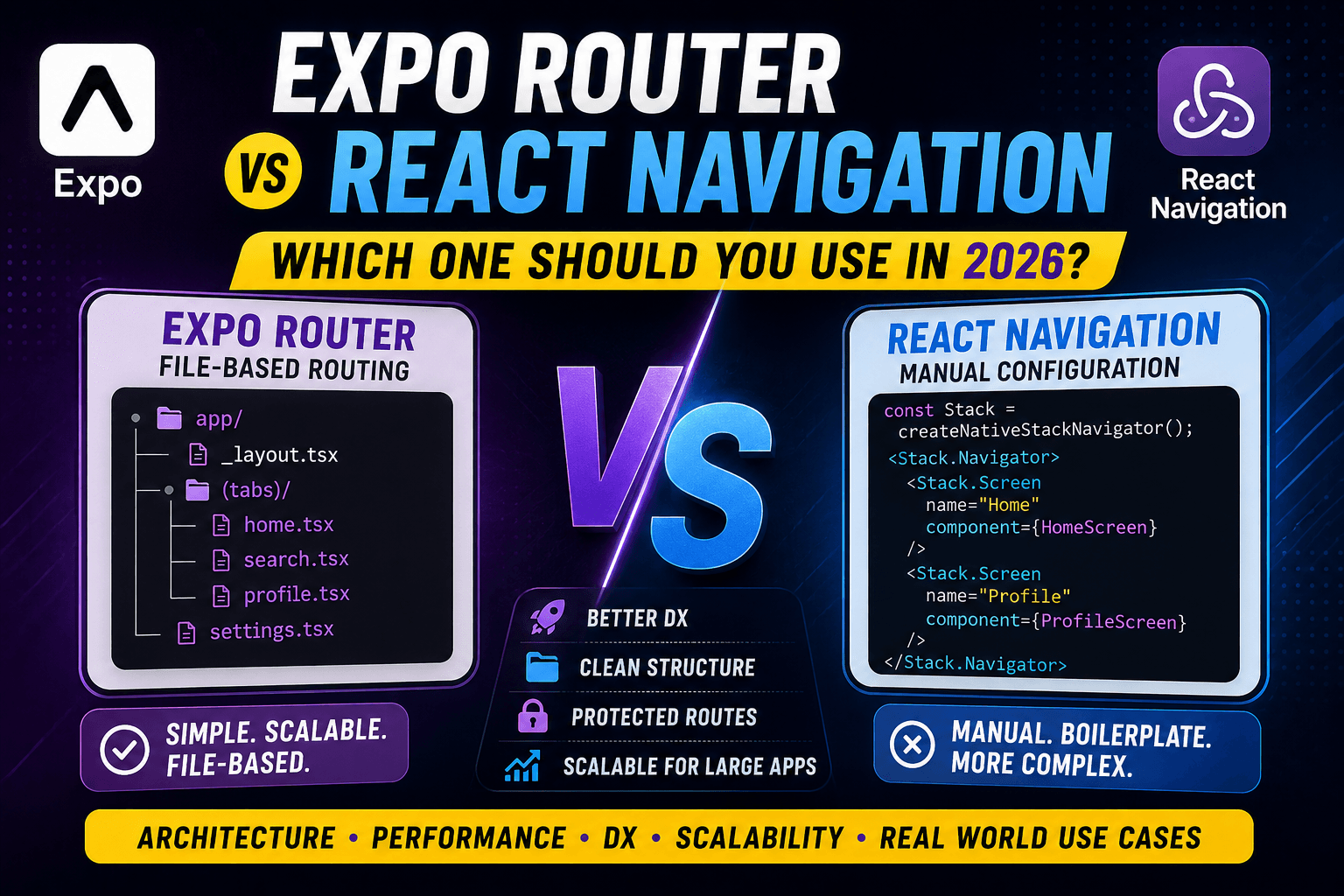
This is where Expo Router becomes very useful.
Expo Router uses file-based routing inspired by frameworks like Next.js.
A scalable structure looks like this:
app/
 ├── (public)/
 │    ├── login.tsx
 │    └── register.tsx
 │
 ├── (protected)/
 │    ├── home/
 │    ├── chat/
 │    ├── profile/
 │    └── settings/
 │
 ├── _layout.tsx
 └── +not-found.tsx
This structure stays clean even when the app grows massively.
Shared Layouts and Nested Routing
One of the best features of Expo Router is shared layouts.
Example:
app/
 ├── (tabs)/
 │    ├── _layout.tsx
 │    ├── home.tsx
 │    ├── chat.tsx
 │    └── profile.tsx
The _layout.tsx file controls shared UI.
This allows:
- Shared tab bars
- Shared headers
- Shared authentication checks
- Shared transitions
Instead of repeating logic everywhere.
This improves maintainability a lot.
Production-Grade Folder Structure
A realistic scalable structure may look like this:
src/
 ├── app/
 │
 ├── features/
 │    ├── auth/
 │    ├── feed/
 │    ├── chat/
 │    ├── ride/
 │    └── video/
 │
 ├── shared/
 │    ├── components/
 │    ├── hooks/
 │    ├── utils/
 │    └── types/
 │
 ├── services/
 │    ├── api/
 │    ├── realtime/
 │    ├── storage/
 │    └── analytics/
 │
 ├── store/
 └── config/
Notice something important.
Feature-specific things stay inside features.
Global systems stay separate.
This balance keeps the architecture maintainable.
Authentication Flow Architecture
Authentication is much bigger than a login screen.
Production apps need:
- Token refresh systems
- Persistent sessions
- Secure storage
- Route protection
- Automatic redirects
- Session restoration
A common auth flow looks like this:
+----------------+
|   App Start    |
+----------------+
         |
         v
+--------------------+
| Check Saved Token  |
+--------------------+
         |
         v
+--------------------+
|   Is Token Valid?  |
+--------------------+
      |        |
   YES|        |NO
      v        v
+-----------+  +------------+
| Protected |  |   Public   |
|  Routes   |  |   Routes   |
+-----------+  +------------+
Expo Router makes this very clean using route groups.
Example:
(public)/
(protected)/
State Management at Scale
State management becomes messy very quickly in large apps.
Many beginners place everything inside Context API.
That usually becomes slow and difficult to maintain.
Production apps separate state into categories.
| State Type | Example |
|---|---|
| Server State | API responses |
| UI State | Modals, loaders |
| Form State | Input handling |
| Global State | User session |
| Cache State | Offline data |
Modern apps usually combine tools instead of using one massive solution.
Example stack:
- Zustand → lightweight global state
- TanStack Query → server state and caching
- React Hook Form → forms
This improves performance and scalability.
API Layer Architecture
One of the most common beginner mistakes is making API calls directly inside components.
Example:
useEffect(() => {
 fetch(...)
}, [])
This becomes very difficult to maintain later.
Production apps create a dedicated networking layer.
Example:
services/
 └── api/
      ├── client.ts
      ├── auth.api.ts
      ├── feed.api.ts
      └── chat.api.ts
Benefits include:
- Centralized error handling
- Retry systems
- Token injection
- API logging
- Better testing
- Easier scaling
This becomes extremely important in large systems.
Realtime Systems
Realtime systems are where mobile architecture becomes truly interesting.
Apps like WhatsApp and Uber depend heavily on realtime infrastructure.
The challenge is not just sending data instantly.
The real challenge is:
- Synchronization
- Reconnection handling
- Battery optimization
- Consistency
- Offline recovery
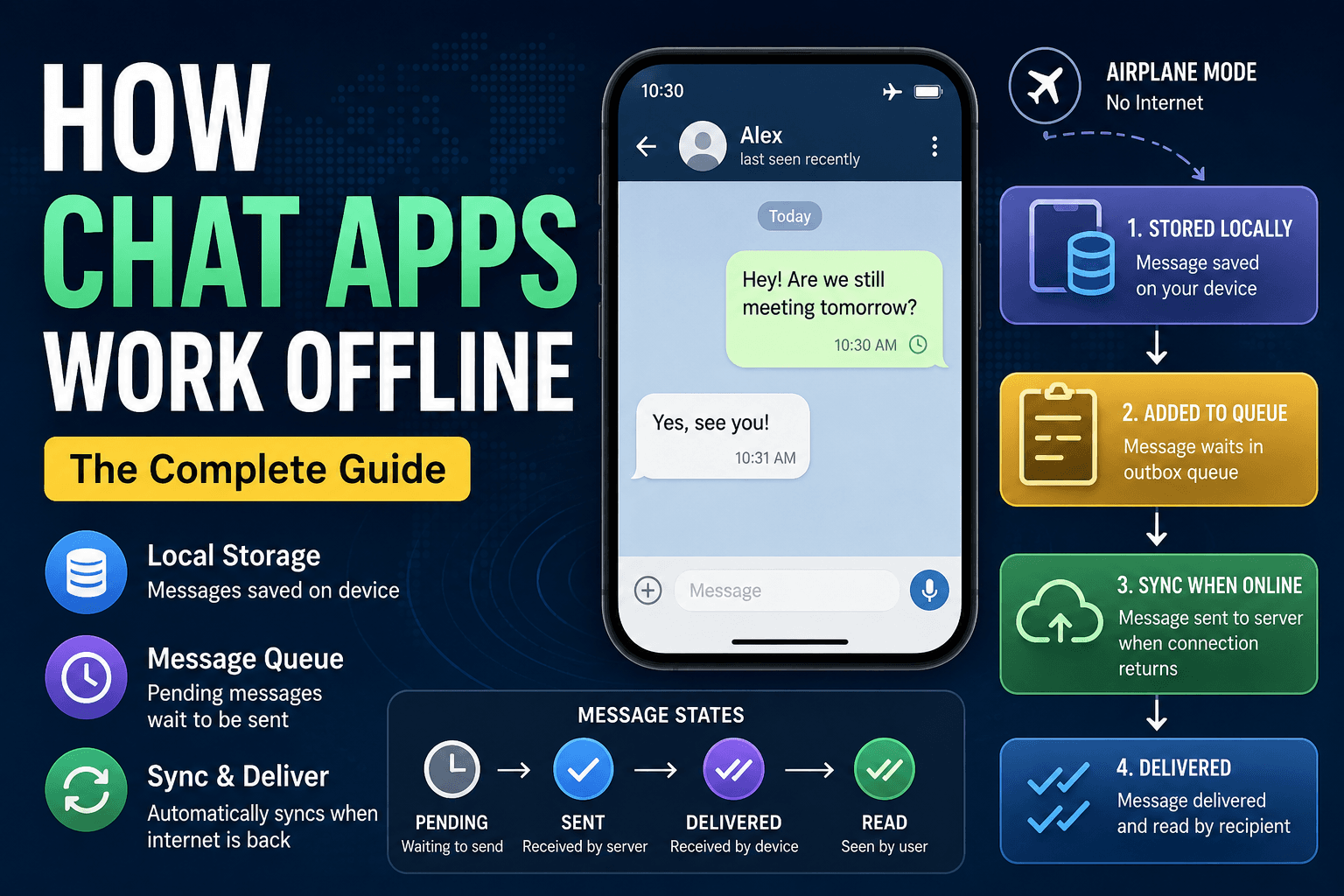
WhatsApp Architecture Thinking
Realtime messaging looks simple from outside.
Internally it includes:
- WebSocket connections
- Message queues
- Delivery acknowledgements
- Read receipts
- Media uploads
- Offline retry systems
A simplified flow looks like this:
+------------------+
| User Sends Msg   |
+------------------+
          |
          v
+----------------------+
| Local UI Update      |
| (Optimistic Update)  |
+----------------------+
          |
          v
+------------------+
| WebSocket Event  |
+------------------+
          |
          v
+----------------------+
| Server Confirmation  |
+----------------------+
          |
          v
+----------------------+
| Message Status Sync  |
+----------------------+
Notice something important.
The message appears instantly before the server confirms it.
This technique is called optimistic UI.
Modern apps rely heavily on this for smooth user experience.
Instagram Feed Engineering
Instagram is interesting because feed systems are extremely expensive.
Problems include:
- Infinite scrolling
- Video autoplay
- Media caching
- Memory management
- Content ranking
- Background prefetching
The app architecture must avoid rendering too many items at once.
That is why production apps use:
- Virtualized lists
- Pagination
- Lazy loading
- Image optimization
- Smart caching
Without these systems, performance collapses quickly.
Uber and Live Tracking
Uber has a completely different challenge.
Its core system depends on realtime location tracking.
Main engineering challenges:
- GPS updates
- Socket synchronization
- Battery optimization
- Map rendering
- Background tracking
- Driver-passenger synchronization
Simplified architecture:
+-------------+
| Driver GPS  |
+-------------+
       |
       v
+----------------+
| Socket Update  |
+----------------+
       |
       v
+------------------+
| Realtime Server  |
+------------------+
       |
       v
+----------------+
| Passenger App  |
+----------------+
But production systems also need:
- Retry systems
- Network recovery
- Location smoothing
- Offline buffering
because mobile networks are unreliable.
Netflix and Heavy Content Delivery
Netflix focuses heavily on performance engineering.
Main challenges include:
- Huge media delivery
- Device optimization
- Smart caching
- Adaptive streaming
- Recommendation systems
Production apps aggressively reduce startup time.
Because even small delays affect user retention.
Offline-First Architecture
Modern mobile apps cannot assume internet is always available.
Offline-first systems dramatically improve reliability.
Basic idea:
+--------------+
| User Action  |
+--------------+
        |
        v
+------------------+
| Store Locally    |
+------------------+
        |
        v
+------------------+
| Sync Later       |
+------------------+
This architecture improves:
- User experience
- Reliability
- Perceived speed
- Battery efficiency
Production apps often combine:
- Local databases
- Request queues
- Sync workers
- Conflict resolution systems
This is one of the hardest problems in mobile engineering.
Cache Synchronization Flow
Typical synchronization flow:
+----------------+
| API Response   |
+----------------+
        |
        v
+----------------+
| Update Cache   |
+----------------+
        |
        v
+----------------+
| Render UI      |
+----------------+
        |
        v
+----------------------+
| Background Refetch   |
+----------------------+
        |
        v
+----------------------+
| Merge Fresh Data     |
+----------------------+
Libraries like TanStack Query automate much of this behavior.
App Startup Optimization
Many apps feel slow because developers overload startup.
Common mistakes:
- Loading everything immediately
- Huge bundle sizes
- Blocking API requests
- Heavy startup animations
Production apps optimize startup aggressively.
Typical startup flow:
+----------------+
| Splash Screen  |
+----------------+
        |
        v
+----------------------+
| Load Critical Config |
+----------------------+
        |
        v
+----------------------+
| Restore Session      |
+----------------------+
        |
        v
+----------------------+
| Initialize Routes    |
+----------------------+
        |
        v
+----------------------+
| Lazy Load Features   |
+----------------------+
Only critical systems should load initially.
Everything else should be deferred.
Performance Engineering in Production
Performance is not one optimization.
It is hundreds of small decisions.
Production apps optimize:
- Re-renders
- Image sizes
- Network requests
- Memory usage
- Bundle size
- Animations
- Background tasks
One badly designed component can slow down the entire application.
This is why architecture matters so much.
Good architecture protects performance.
Tradeoffs Large Teams Make
One important thing beginners should understand:
There is no perfect architecture.
Every engineering decision has tradeoffs.
| Decision | Benefit | Cost |
|---|---|---|
| Feature-based architecture | Better scalability | More setup initially |
| Global state | Easier data sharing | Can create coupling |
| Offline support | Better UX | Higher complexity |
| Realtime systems | Instant updates | Expensive infrastructure |
| Heavy caching | Faster experience | Cache invalidation issues |
Senior engineers constantly balance these tradeoffs.
Architecture is mostly decision-making.
The Real Goal of Architecture
Many developers think architecture exists to make code look professional.
Actually, architecture exists to solve team problems.
Good architecture helps teams:
- Ship features faster
- Debug issues faster
- Scale safely
- Reduce technical debt
- Onboard developers quickly
That is the real purpose.
Final Thoughts
Modern React Native engineering is not just about screens and components anymore.
Production apps are systems.
They involve:
- Navigation architecture
- State orchestration
- Realtime communication
- Offline synchronization
- Performance engineering
- Scalability planning
And honestly, this is what makes mobile engineering interesting.
The difference between a beginner project and a production application is usually not UI quality.
It is architecture quality.
That is why learning architecture early matters so much.
Frameworks will change.
Libraries will change.
But scalable engineering thinking will always remain valuable.