JavaScript Modules - Complete story about JavaScript Modules
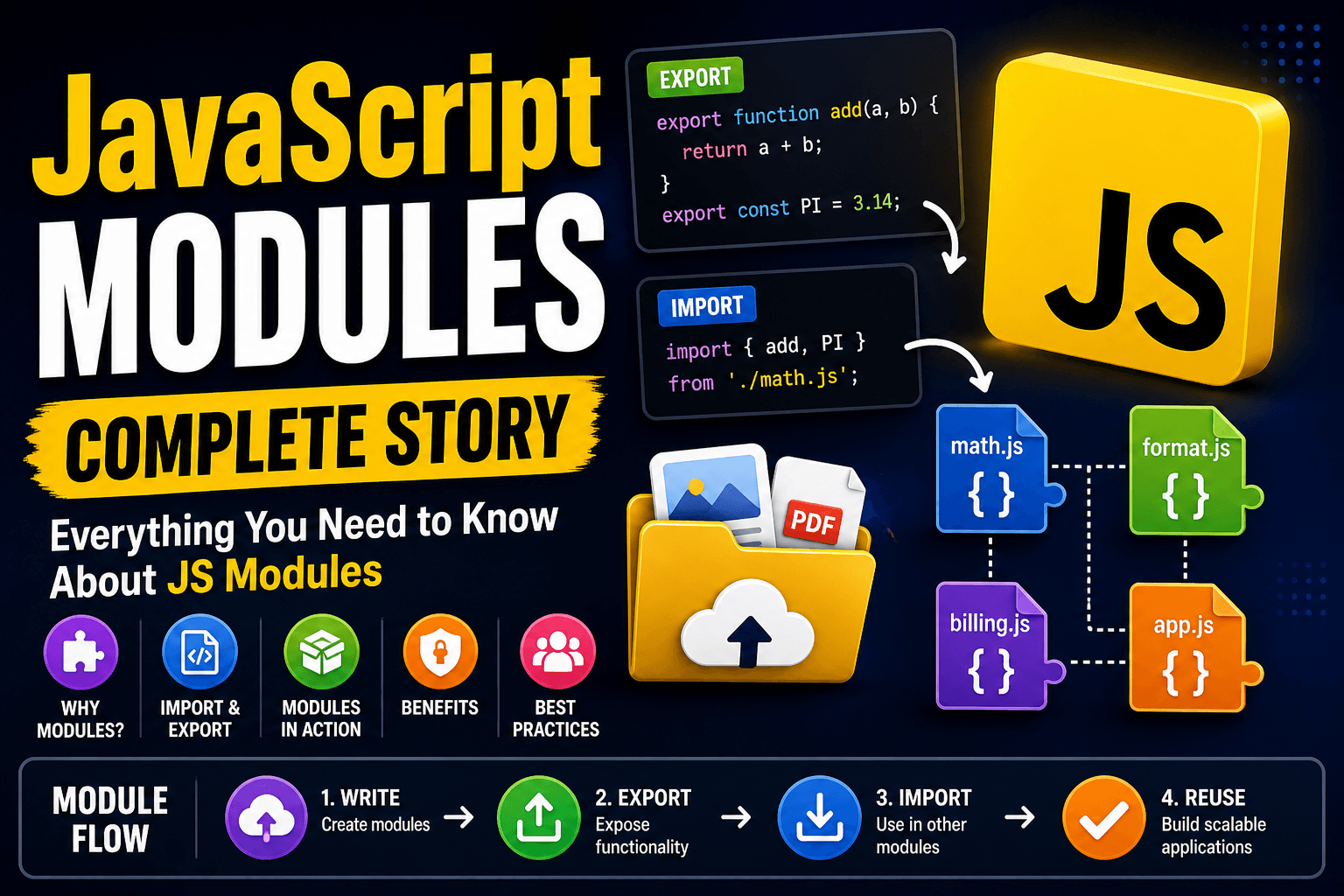
In this article, we are going to have an in-depth discussion about JavaScript modules. Why do we actually need a module and all the related terminology that are connected with it, like import & export? So let's begin our discussion.
Need for JavaScript Modules:
JavaScript was first created to make web pages interactive & dynamic instead of static. But as the internet grew, applications became more complex, and JavaScript started being used in many areas, like web, mobile, and more.
With this growth, codebases also became bigger. Managing everything in a single file becomes very difficult, especially when there are thousands of functions and variables. It also becomes hard for new developers to understand the code, so maintenance becomes difficult.
To solve this problem, modular programming was introduced. In 2015, ES6 added native support for modules using import and export, making code more organized and easier to manage.
How we use Modules
Before going into the usage part, let's take some non-modular code function examples so we can later make them modular and see how they're used.
Without Module
// app.js

const taxRate = 0.1;

function calculateTotal(price) {
  return price + price * taxRate;
}

function formatPrice(amount) {
  return "₹" + amount.toFixed(2);
}

function printBill(price) {
  const total = calculateTotal(price);
  console.log("Total:", formatPrice(total));
}

printBill(100);
Now, as you can see here, all of the functions are written in the same file, and all the variables are also declared in the same file. For a small codebase, it is okay, but assume it has 2,000 lines of code. Difficult to reuse the function, so much back and forth, and no separation of concerns there.
Problem in this code
Explain why exactly the current code is bad:
Everything is tightly coupled
No clear responsibility (business logic + formatting mixed)
Hard to reuse
formatPriceelsewhereRisk of variable conflicts (
taxRatereused somewhere else)
Now break it down to implement the module
Step 1: Create separate files
math.js
const taxRate = 0.1;

export function calculateTotal(price) {
  return price + price * taxRate;
}
format.js
export function formatPrice(amount) {
  return "₹" + amount.toFixed(2);
}
app.js, and the use case
import { calculateTotal } from "./math.js";
import { formatPrice } from "./format.js";

function printBill(price) {
  const total = calculateTotal(price);
  console.log("Total:", formatPrice(total));
}

printBill(100);
Due to this implementation, we can now reuse the CalculateTotal and formatPrice functions multiple times.
Import & Export Core Concepts
Named Exports
To export multiple things from a file, whenever you use them, make sure the called them by the same name. We can't change the name of a method or variable during import.
export function a() {}
export function b() {} // Function export
export const PI=3.14 // Variable Export
import { a, b, PI } from "./file.js";
// You can't call a to apple during import
Default Export
This also works similarly, with a few differences. A single file only contains one default export. During import, you can give any name to that imported method or variable as you wish.
export default function greet() {}
import greetUser from "./file.js";
Modules are scoped
Variables inside modules are NOT global
They don’t pollute the global namespace
Modules are loaded once
The imported file runs only one time
Then cached, this is why shared state works across imports

Note: Key things to rember one module can actually use another module, and a single file can import multiple files as well. To understand this, let's take a few examples.
File Structure
app.js
billing.js   (depends on math.js)
math.js
format.js
math.js
export function addTax(price, taxRate) {
  return price + price * taxRate;
}
billing.js (Depends on math.js)
import { addTax } from "./math.js";

export function getFinalAmount(price) {
  const taxRate = 0.1;
  return addTax(price, taxRate);
}
format.js (Independent module)
export function formatPrice(amount) {
  return "₹" + amount.toFixed(2);
}
app.js (Imports 2 modules)
import { getFinalAmount } from "./billing.js";
import { formatPrice } from "./format.js";

const price = 100;

// Uses billing (which internally uses math)
const finalAmount = getFinalAmount(price);

// Uses another independent module
console.log("Final Price:", formatPrice(finalAmount));

Benefits of Modular Code
Maintainability
- Assume we are checking if a user is logged in with a single script. In a large code file, changing the login logic requires locating the specific method. With modular syntax, we simply update the user file, handling all related operations.
Reusability
- We can reuse the modules in multiple areas, for example user logged in is a thing that we want to check in multiple pages.
Team Collaboration
- Due to the modular code approach codebase becomes easy to understand, which helps new developers to collaborate quickly.
Scalability
- If the size of the codebase increases over time, in a modular approach, it is easy to find bugs and errors.
conclusion
JavaScript modules help you split your code into smaller, manageable pieces. By using export and importYou can reuse functionality, keep your code organized, and avoid confusion as your project grows.